Vector Tracing & Logo Redraw: 9 Powerful Benefits for a Better Brand
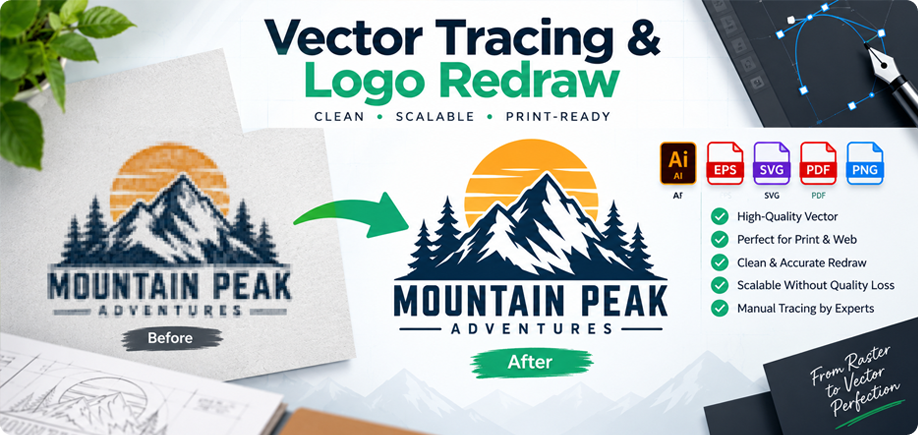
Vector Tracing & Logo Redraw is an essential service for businesses that only have a blurry, pixelated, scanned, or low-resolution version of their logo. A logo may look acceptable when viewed at a small size on a website or social media profile, but problems often appear when the same artwork is enlarged for business cards, signs, uniforms, packaging, banners, vehicle graphics, or other professional applications.
The reason is simple: most JPG and PNG files are raster images made from pixels. When a small raster image is enlarged beyond its original resolution, the edges can become rough, jagged, or blurry. A properly created vector logo, however, is built from mathematical paths, curves, and shapes, allowing it to scale from a small label to a large billboard while maintaining sharp, clean edges.
This guide explains what Vector Tracing & Logo Redraw means, the difference between raster and vector artwork, when a business needs this service, the benefits of professional vector files, the most common file formats, and how ONNAX approaches manual logo recreation.
Table of Contents
- What Is Vector Tracing & Logo Redraw?
- Raster vs Vector: What Is the Difference?
- 9 Reasons Your Business Needs a Professional Vector Logo
- When Should a Logo Be Redrawn?
- How Professional Vector Tracing Works
- Common Vector File Formats
- Common Vector Tracing Mistakes
- Who Needs Vector Tracing & Logo Redraw?
- The ONNAX Vector Redraw Process
- Final Thoughts
What Is Vector Tracing & Logo Redraw?
Vector Tracing & Logo Redraw is the process of recreating an existing raster image, screenshot, scan, photograph, sketch, or low-resolution logo as clean and editable vector artwork.
Instead of simply enlarging the original image, the design is rebuilt using vector paths, geometric shapes, controlled curves, colors, and typography. The purpose is to create a professional source file that closely matches the original logo while improving technical quality, edge smoothness, alignment, symmetry, and scalability.
This service is especially useful when the original design files are no longer available. A business may have used the same logo for many years but only have a small JPG copied from an old website or email signature. In other cases, the only available reference may be a photograph of a sign, a scan of a business card, or a screenshot from social media.
A professional redraw can preserve the recognizable appearance of the existing brand while turning it into artwork that is much easier to print, edit, resize, and reuse.
Raster vs Vector: What Is the Difference?
Understanding the difference between raster and vector files helps explain why professional logo redraw work is important.
Raster Images
Raster graphics are made from pixels. Common raster formats include JPG, JPEG, PNG, BMP, GIF, and TIFF. Raster images are ideal for photographs and detailed digital images, but they have a fixed resolution.
If a small raster logo is enlarged too much, the individual pixels become visible. This can result in blurry edges, jagged lines, fuzzy text, and an overall unprofessional appearance.
For example, a logo taken from a website may look perfectly acceptable at 300 pixels wide, but the same file may not be suitable for a large sign or printed banner.
Vector Graphics
Vector graphics are created from mathematical paths, points, curves, and shapes. These elements can be enlarged or reduced without losing sharpness.
Common vector formats include AI, EPS, and SVG. PDF files can also contain vector artwork when exported correctly from professional design software.
For logos, icons, lettering, line art, signage, and many types of print graphics, vector artwork gives businesses greater flexibility because the design can be resized, recolored, and edited more easily.
9 Reasons Your Business Needs a Professional Vector Logo
1. Your Logo Can Be Enlarged Without Becoming Blurry
One of the biggest benefits of vector artwork is unlimited scalability. A professional vector logo can be used on a small product label, social media graphic, letterhead, storefront sign, trade-show display, or vehicle wrap while maintaining clean and sharp edges.
This removes one of the most common production problems businesses face: sending a low-resolution logo to a printer and discovering that it looks pixelated when enlarged.
2. You Get Better Print Quality
Printers often prefer vector artwork because it provides cleaner output and greater control over production.
A properly prepared vector file can reduce issues such as rough outlines, fuzzy text, unwanted backgrounds, inconsistent colors, and poor edge quality.
Whether your logo is being printed on business cards, brochures, packaging, uniforms, signs, stickers, or promotional materials, having a clean vector master file makes the process easier.
3. Your Logo Becomes Easier to Edit
Vector artwork is created from separate editable objects, making it easier to change colors, adjust shapes, create alternate versions, or prepare artwork for different applications.
A business may need several versions of the same logo, including:
- Full-color version
- Black version
- White or reversed version
- Single-color version
- Light-background version
- Dark-background version
- Horizontal version
- Square or icon version
When the master artwork is properly created in vector format, these variations can be prepared much more efficiently.
4. It Improves Brand Consistency
Businesses often accumulate several slightly different versions of the same logo over time. One file may have a different shade of color, another may be stretched, and another may have incorrect spacing or proportions.
A professional Vector Tracing & Logo Redraw project can create one clean master version that becomes the main reference for future use.
This helps maintain consistent proportions, colors, typography, line thicknesses, and alignment across websites, packaging, social media, stationery, and printed marketing materials.
5. It Makes Large-Format Printing Easier
Large-format applications require artwork that can be scaled significantly without losing quality.
This includes:
- Storefront signage
- Vehicle graphics
- Exhibition displays
- Wall graphics
- Billboards
- Large banners
- Window graphics
- Trade-show booths
A small JPG may not contain enough information for these applications. A vector redraw solves this by creating resolution-independent artwork.
6. It Helps With Apparel and Embroidery Preparation
Apparel production often requires clean artwork. Although embroidery machines use specialized digitized stitch files rather than standard vector files, a clean vector logo provides an excellent starting point for the digitizing process.
Clear shapes, simplified paths, and defined outlines make it easier for production teams to interpret the artwork correctly.
Vector artwork can also be useful for screen printing, vinyl cutting, DTF, DTG, heat-transfer printing, and other garment decoration methods.
7. It Supports Vinyl Cutting and Sign Production
Many sign-making and vinyl-cutting workflows rely on clean vector paths.
Artwork with rough raster edges can create problems when preparing files for decals, lettering, stickers, window graphics, and cut vinyl.
A manual redraw creates cleaner shapes and more controlled paths, making the artwork easier to prepare for production.
8. It Protects Your Brand Assets
Many companies lose their original design files over time. The original designer may no longer be available, old computers may have been replaced, or the files may have been deleted.
Recreating a logo as a professional vector file gives the business a new master asset that can be archived and reused for future projects.
This reduces dependence on one small image and protects the visual quality of the brand.
9. It Makes Future Design Work Faster
Graphic designers, printers, sign makers, web developers, embroidery companies, packaging suppliers, and marketing agencies often need access to a clean logo file.
If the logo already exists in vector format, future design projects can begin immediately instead of requiring the logo to be cleaned or recreated every time.
This can save both time and cost across future marketing and production work.
When Should a Logo Be Redrawn?
A business may need professional Vector Tracing & Logo Redraw when the available artwork is not suitable for professional use.
Common situations include:
- You only have a small JPG or PNG
- Your logo becomes blurry when enlarged
- The original AI, EPS, or SVG file is missing
- You only have a screenshot of the logo
- The logo was scanned from paper
- You only have a photograph of an old sign
- The artwork contains rough or uneven edges
- The logo has unwanted background pixels
- A printer has requested vector artwork
- You need a transparent version
- The logo needs color changes
- The artwork needs smoother curves
- The design needs cleaner symmetry or alignment
It is important to understand that logo redraw and logo redesign are not the same thing.
In a redraw project, the goal is usually to preserve the existing design while improving the technical quality. A redesign, on the other hand, may involve changing the concept, typography, icon, colors, or overall style.
How Professional Vector Tracing Works
Professional vector tracing is more than pressing an automatic trace button.
Automatic tracing tools can sometimes be useful for very simple artwork, but they often produce too many anchor points, rough edges, distorted shapes, uneven curves, and inaccurate lettering.
Manual recreation provides much better control over the final result.
Step 1: Review the Original Artwork
The first step is to study the source image and identify the logo’s main shapes, typography, colors, proportions, line thicknesses, and spacing.
If the reference is very small or blurry, the artwork may need to be interpreted carefully so that the final vector remains faithful to the original.
Step 2: Rebuild the Main Shapes
The logo is recreated using vector paths and geometric shapes.
Where possible, shapes are simplified and constructed efficiently so that the artwork remains clean and editable.
Step 3: Refine Curves and Corners
Smooth vector curves depend on well-placed anchor points and handles. Too many unnecessary points can create uneven shapes and make future editing difficult.
Professional redraw work focuses on clean paths, balanced curves, accurate corners, and consistent geometry.
Step 4: Recreate or Match Typography
Typography is an important part of many logos. If the original font is known and available, it may be possible to match the text directly.
If the lettering is custom or the original font cannot be found, the text may need to be manually recreated as vector shapes.
Attention should be given to letterforms, spacing, alignment, weight, and proportions.
Step 5: Match the Colors
Colors are recreated based on the available reference. Depending on the intended use, RGB values may be prepared for screens and CMYK values for printing.
Businesses should remember that screen colors and printed colors can differ, so exact physical color matching may still require standardized references or printer proofs.
Step 6: Perform a Quality Check
The final artwork should be reviewed at both small and large sizes.
This helps identify:
- Uneven curves
- Incorrect spacing
- Misaligned elements
- Unwanted gaps
- Overlapping paths
- Excessive anchor points
- Color inconsistencies
- Typography errors
Once these issues are corrected, the artwork is ready for export.
Common Vector File Formats
Different printers, designers, websites, and production companies may request different file formats.
AI — Adobe Illustrator
AI is the native Adobe Illustrator format and is commonly used as the editable master source file.
EPS — Encapsulated PostScript
EPS is widely used in printing, signage, apparel, and professional production workflows.
SVG — Scalable Vector Graphics
SVG is ideal for websites, digital interfaces, icons, Cricut-style cutting workflows, and scalable online graphics.
PDF — Portable Document Format
PDF files can contain vector artwork and are commonly used for sharing print-ready designs with printers, clients, and vendors.
PNG — Transparent Raster Preview
PNG is not a vector format, but it is useful for websites, presentations, social media, and documents because it can support transparent backgrounds.
A complete logo package often includes both editable vector source files and convenient raster versions for everyday use.
Common Vector Tracing Mistakes to Avoid
Using Automatic Trace Without Cleanup
Automatic tracing can create hundreds or thousands of unnecessary points. This can make the artwork difficult to edit and may produce rough or irregular edges.
Changing the Original Design Accidentally
If the client wants a redraw rather than a redesign, the final vector should preserve the original concept, proportions, typography, and overall visual character.
Ignoring Typography Accuracy
Incorrect fonts, letter spacing, line spacing, or text proportions can make a redrawn logo look noticeably different from the original.
Using Too Many Anchor Points
Clean vector artwork generally benefits from efficient paths. Fewer well-positioned points often create smoother curves and easier editing.
Not Checking the Design at Large Size
Small imperfections that are difficult to see on screen may become very obvious when the logo is enlarged for signage or printing.
Providing Only One File Format
Different vendors may request different file types. Providing several practical formats makes the logo more useful for future applications.
Who Needs Vector Tracing & Logo Redraw?
This service can benefit many types of businesses, professionals, and production companies.
It is especially useful for:
- Small businesses with outdated logo files
- Startups with only raster artwork
- Print shops
- Sign makers
- Embroidery companies
- Screen-printing businesses
- Apparel brands
- Packaging companies
- Marketing agencies
- Graphic designers
- Vehicle wrap companies
- Schools and organizations
- Restaurants
- Retail businesses
- Event companies
Even an old logo can often be professionally recreated without changing the recognizable identity customers already know.
The ONNAX Vector Tracing & Logo Redraw Process
At ONNAX, Vector Tracing & Logo Redraw focuses on accuracy, clean construction, scalability, and practical usability.
The objective is to preserve the original design while creating a professional vector master file that works for both print and digital applications.
- Source Review: We examine your JPG, PNG, scan, screenshot, photograph, or existing artwork.
- Manual Recreation: The main shapes and paths are carefully rebuilt rather than relying only on automatic tracing.
- Shape Refinement: Curves, corners, proportions, line thicknesses, and alignment are cleaned and improved.
- Typography Matching: Lettering is matched or recreated as accurately as possible.
- Color Preparation: Colors are prepared according to the intended print or digital workflow.
- Quality Review: The artwork is checked for smoothness, spacing, symmetry, unwanted points, gaps, and inconsistencies.
- File Export: Final artwork can be supplied in formats such as AI, EPS, SVG, PDF, and PNG depending on project requirements.
This workflow can be used for simple logos as well as more complex illustrations that require careful manual reconstruction.
Final Thoughts: Turn Your Low-Quality Logo Into a Professional Brand Asset
A blurry, pixelated, or low-resolution logo can create unnecessary problems whenever your business needs professional printing, signage, packaging, apparel, marketing materials, or large-format graphics.
Professional Vector Tracing & Logo Redraw gives you a clean, scalable, and editable version of your existing artwork without forcing you to replace a brand identity you already value.
A properly created vector master file can be reused across many future projects, improving consistency and reducing the need to repeatedly clean or recreate the same logo.
The most important goal is accuracy. A professional redraw should preserve the recognizable appearance of the original while improving the technical quality of the artwork.
ONNAX can convert your blurry, pixelated, scanned, or low-resolution logo into clean professional vector artwork. Whether you need files for printing, signage, apparel, packaging, embroidery preparation, web use, or future brand materials, we can prepare scalable artwork that is easier to edit and reuse.
Contact ONNAX to discuss your Vector Tracing & Logo Redraw project and turn your existing artwork into a clean, professional vector file.